
Documentation
Pointwolf: Epic Order for Jira
Pointwolf gives every epic its own order. Drag the epic's stories into the order your team agreed on. Every story shows its place in the epic, and the board's rank stays where it is until you choose to push the order to the board.
Works with Jira Cloud, in company-managed and team-managed software projects. Pointwolf runs entirely on Atlassian Forge, and no data leaves Atlassian.
Install
- A Jira admin opens Apps → Explore more apps in Jira and searches for Pointwolf, or opens the listing on the Atlassian Marketplace.
- Choose Get app (or Try it free), then review and accept the permissions. They're explained under Permissions.
- Open any epic. The Pointwolf: Epic Order for Jira panel is available under the epic's summary. If you don't see it, select the Pointwolf icon, or Apps, in the row of buttons under the summary.
Sites with up to 10 users use Pointwolf free. Larger sites get a 30-day free trial. See Pricing and licensing.
Order an epic
The panel shows on epics, and on higher levels such as initiatives. It lists every child issue with its type, key, summary, status and assignee.
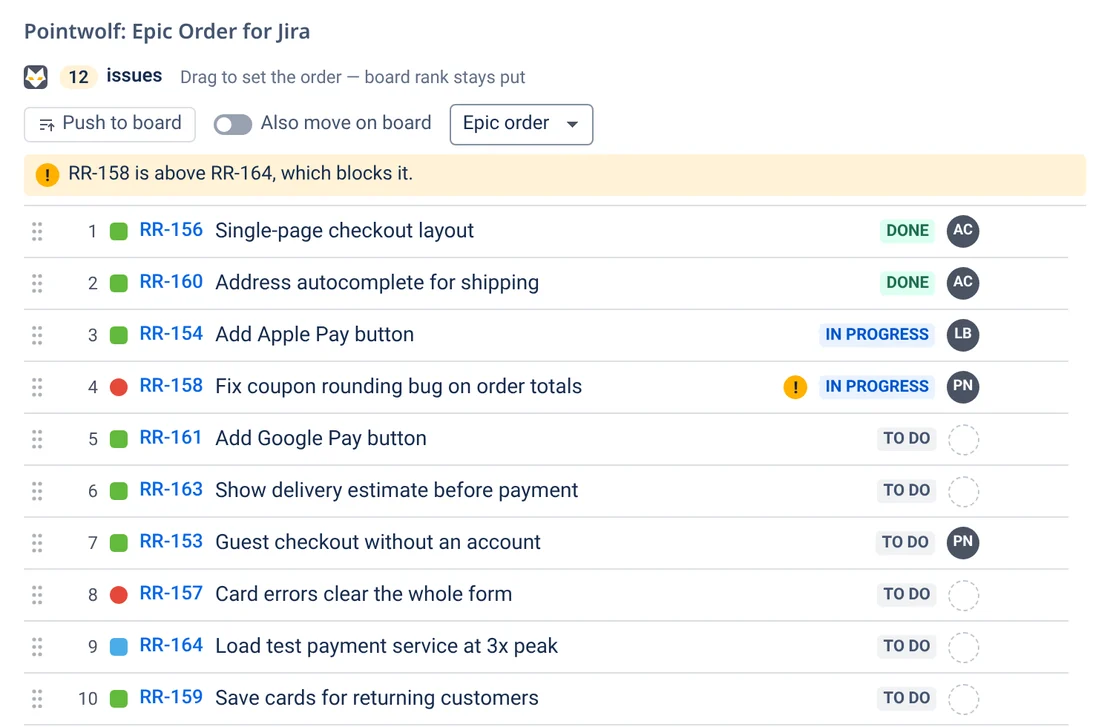
- Drag a row to a new place. The new order saves straight away, and Undo appears for a few seconds.
- Keyboard: focus a row, press Space to pick it up, move it with ↑ ↓ (or Home / End), and press Space again to drop it. Esc cancels. Screen readers announce each step.
- Move to top / Move to bottom: hover a row and use the arrow buttons at its end.
- Your own view: the menu at the top sorts the list by Epic order, Board rank, Status, Priority or Key. It's saved for you only and doesn't change the shared order. Switch back to Epic order to drag.
- Blocker warnings: if a story is ordered above an issue that blocks it (a “blocks” link), Pointwolf flags it. It's a warning only. Nothing stops the move.
Saving the epic order doesn't email anyone, doesn't add anything to the issue history and doesn't change the “Updated” date.
“#4 of 12” on stories
Once an epic has been ordered, every story in it shows its place. On the story, the Epic order item in the details area shows a #4 of 12 badge. Open it to see the stories just before and after it, and a warning if something that blocks it is ordered later.
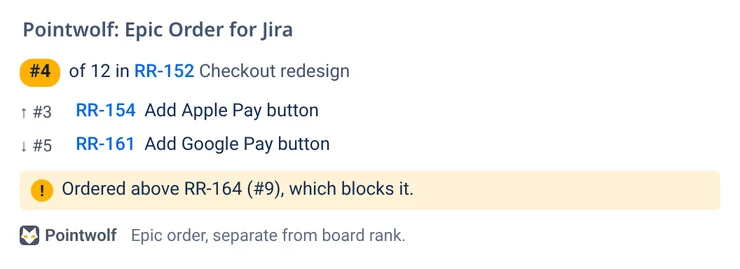
The badge appears after someone has put the epic in order in the panel. It updates on its own when the order changes.
Push the order to the board
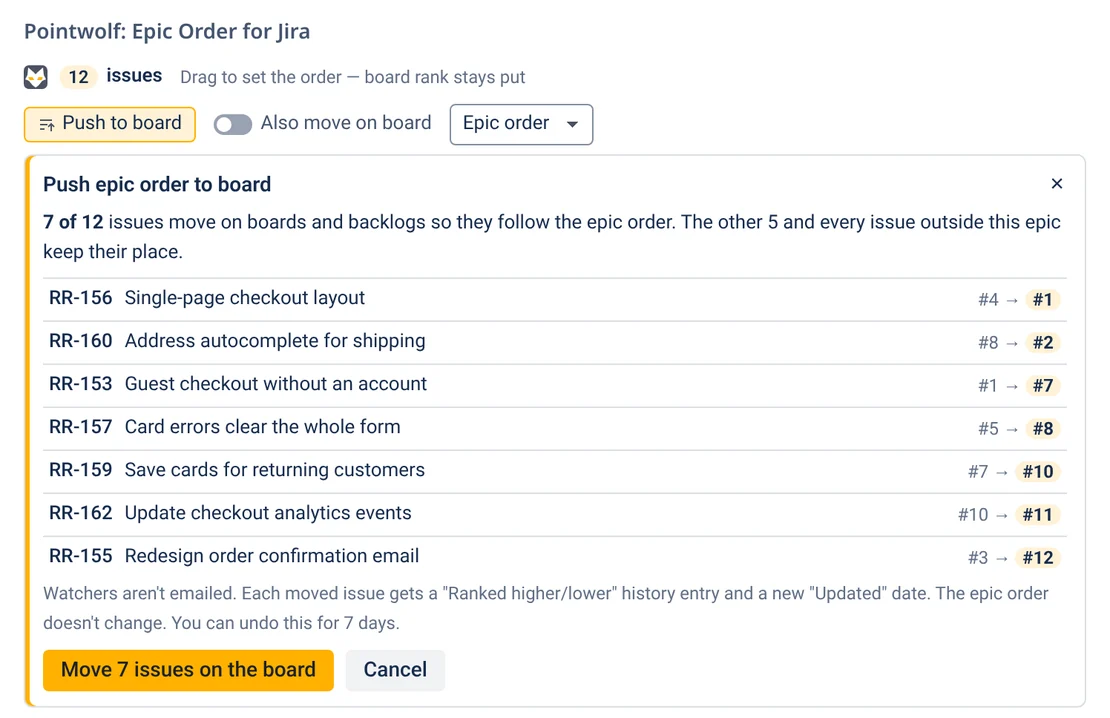
When you want boards and backlogs to follow the epic order, use Push to board in the panel.
- Preview. Pointwolf lists only the issues that need to move, with each one's old and new position. Every other issue keeps its place.
- Confirm. Pointwolf ranks the issues as you, in batches. Each moved issue gets Jira's usual “Ranked higher/lower” history entry and a new “Updated” date. Watchers aren't emailed.
- Undo. Use Undo in the confirmation message, or Push to board → Undo last push for up to 7 days. Every moved issue goes back where it was.
Also move on board is an optional switch: when it's on, a story you move in the epic is also moved on the board, but only when its board position conflicts with the new epic order. It's saved for you only.
Project types and JQL
- Company-managed projects: the order is saved in the Epic position field. Use it in filters, exports and JQL, for example
parent = RR-152 ORDER BY "Epic position". - Team-managed projects: these can't use app fields, so the order is saved as data on each issue. Everything in the panel works the same way, but you can't sort by Epic position in JQL.
Permissions
Pointwolf follows Jira's own permissions. It only shows what each person can already see.
| To… | You need |
|---|---|
| See the epic order and the “#4 of 12” badge | Browse projects |
| Change the epic order | Edit issues for those issues. Everyone else sees the order in view-only mode. |
| Push to board, Undo a push, Also move on board | Schedule issues (Jira's permission to rank issues) |
What the app asks for when it's installed, and why:
| Permission | Why Pointwolf needs it |
|---|---|
read:jira-work | Read an epic's child issues, their links and their board rank |
write:jira-work | Save the order on team-managed issues, and mark an epic as ordered so its stories show their badge |
read:jira-user | Show assignee names and avatars |
storage:app | Your sort view, Undo records for pushes, and saved badge positions |
write:app-data:jira | Save values in the app's Epic position field |
write:issue:jira-software | Rank issues on the board when you push |
Pricing and licensing
Pointwolf is sold through the Atlassian Marketplace, and Atlassian handles billing.
| Site size | Price |
|---|---|
| 1–10 users | Free |
| More than 10 users | $0.50 per user per month, for every user on the site (for example, 25 users is $12.50 a month) |
- Sites with more than 10 users get a 30-day free trial.
- Annual plans and larger tiers are priced on the Marketplace listing, which always shows the current prices.
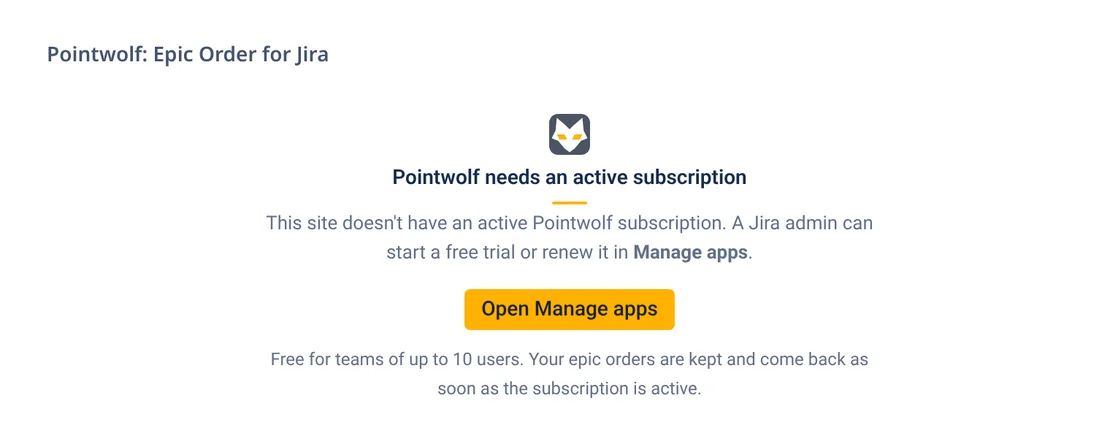
- If a site's subscription ends, Pointwolf shows a short message in place of the panel, asking an admin to start a trial or renew. Epic orders are kept and come back as soon as the subscription is active again.
- To start, renew or cancel: a Jira admin goes to Settings → Apps → Manage apps and finds Pointwolf, or uses the site's billing page at admin.atlassian.com.
Your data
Pointwolf runs on Atlassian Forge and has no servers of its own. The epic order is saved on your Jira issues, and preferences and Undo records are saved in Forge storage on your site, in your site's data-residency location. No analytics, no tracking, and nothing is sent outside Atlassian. Details are in the privacy policy.
Uninstalling: Jira hides the Epic position field and keeps its values for 30 days, so reinstalling within that time brings them back. Board rank changes you pushed stay in Jira.
Troubleshooting
I don't see the panel
The panel shows on epics (and higher levels) only, not on stories. Open the epic and select the Pointwolf icon, or Apps, under the summary.
A story doesn't show “#4 of 12”
The badge appears once its epic has been put in order in the panel. Open the epic, move any story (or just open the panel as someone who can edit), then reload the story.
I can see the order but can't drag
You need the Edit issues permission for those issues, and the list must be in Epic order view. Ask a Jira admin if you need access.
Push to board is greyed out
Pushing changes board rank, which needs Jira's Schedule issues permission in that project.
It says “Pointwolf needs an active subscription”
The site's trial or subscription has ended. A Jira admin can start a trial or renew in Settings → Apps → Manage apps. Nothing is lost in the meantime.
Support
Email [email protected]. We aim to reply within one business day. Please include your site address (for example yourcompany.atlassian.net) and the issue key you were looking at.
Pointwolf: Epic Order for Jira is made by Pointwolf. Jira and Atlassian are trademarks of Atlassian. Pointwolf isn't affiliated with or endorsed by Atlassian.